
Exporting maFiles
In NebulaAuth, you can quickly export maFiles to a selected folder by providing an account list and choosing the required options.
This is useful when you need to transfer accounts to another instance of the application, make a backup, or prepare files for use in other tools.
To avoid configuring the same export settings every time, NebulaAuth uses templates.
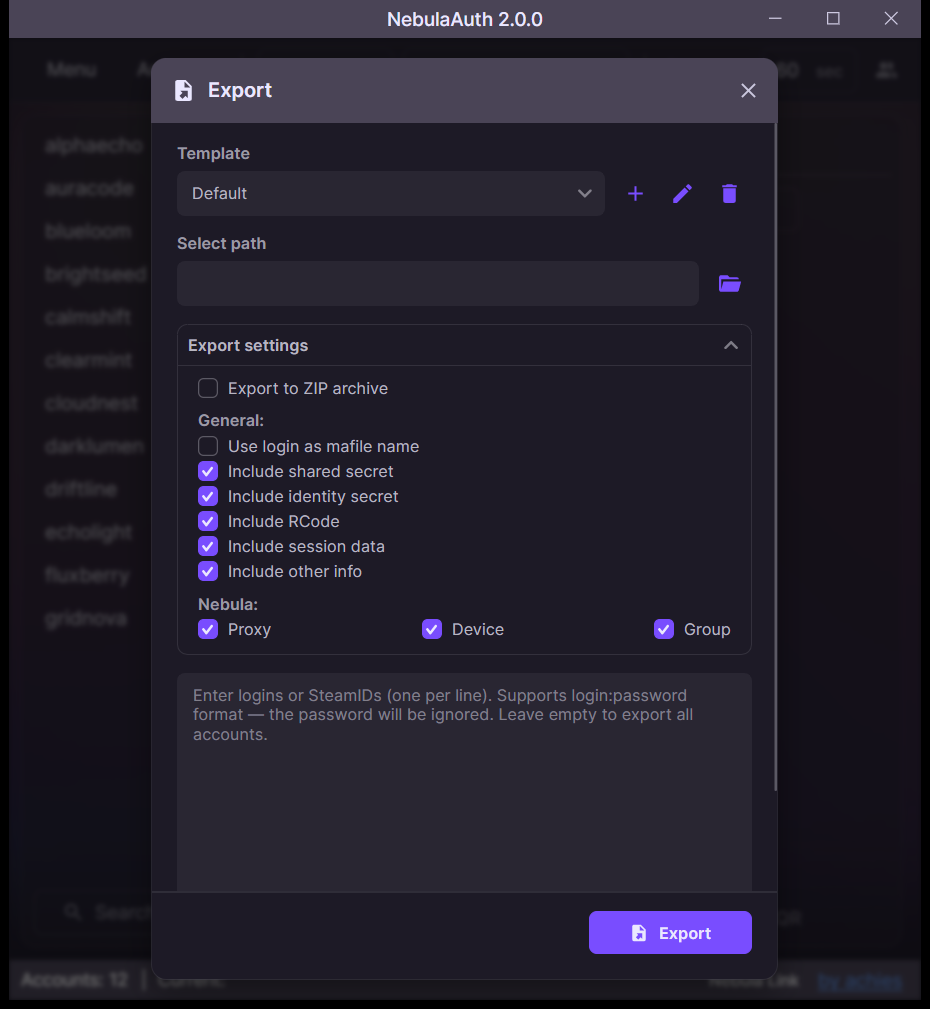
What is a template
A template is a preset that defines:
- which fields to include in the export
- where to save the files
- how to name the files
You can create templates and save them under your own names.
How to export maFiles
- Open Menu → Other → Export
- Select a template or choose the required fields
- Enter the account list, using logins or SteamIDs, one per line, or leave it empty to export all accounts
- Select the destination folder
- Start the export
- Matching accounts will be copied to the selected folder
Field configuration
When configuring the template, you can choose which data to include in the maFile:
- main fields,
shared_secret,identity_secret,revocation_code - session data
- additional maFile fields
- NebulaAuth fields,
Proxy,GroupandDevice, the device model - file name format, by SteamID or by login
- export to a ZIP archive instead of a folder
To see exactly what is exported and why a field is needed, hover over it and wait for the tooltip.
More details: Technical information about the maFile
Restrictions
- exporting to NebulaAuth folders,
maFiles,maFiles_removed, andmaFiles_backup, is not allowed - if a file with the same name already exists, it will NOT be overwritten
- exported files without the main fields will not work in NebulaAuth, because all main data is required for correct operation
Partial export, truncated maFile
Sometimes a so-called truncated maFile is used.
This is a file that contains only:
- the account login
shared_secret
Such a maFile:
- lets you generate login codes
- does not provide access to confirmations or full Steam Guard management
Danger
Even a truncated maFile is not completely safe.
Do not pass such files to people you do not trust.
They can be used for unwanted activity, such as logging into the account, spam, or other actions.
Export result
After completion, you receive a report showing:
- how many accounts were exported
- how many were not found
- how many conflicts occurred